
How to export users & activities
Exporting Users & Activity
Corma lets you export your user directory and their activity logs as CSV files.
This is useful for audits, reporting, or sharing data with your team.
How to export users
Go to the Users page
Use the filters at the top to narrow down the list if needed ; for example, filter by extension status, HR status, department, or any other attribute
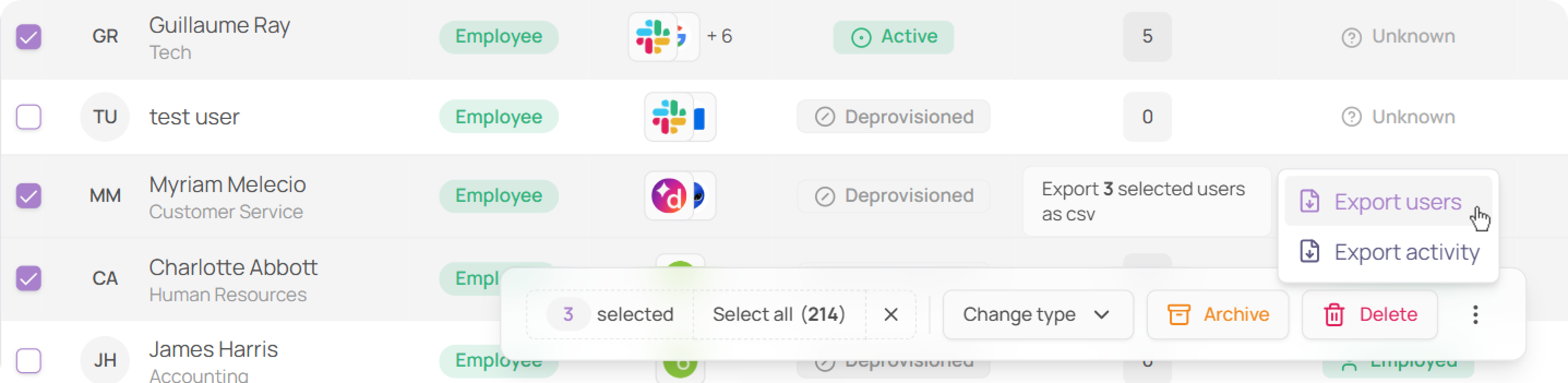
Bulk select the users you want to export by checking the boxes on the left
In the bottom action bar, click the three dots (⋯)
Click Export users, a CSV file will download automatically
Your export is generated in the background and sent to your inbox by email, it won't download automatically.
How to export activity
Follow the same steps above, then click Export activity instead of Export users.
Was this helpful?