

Overview
Applications page
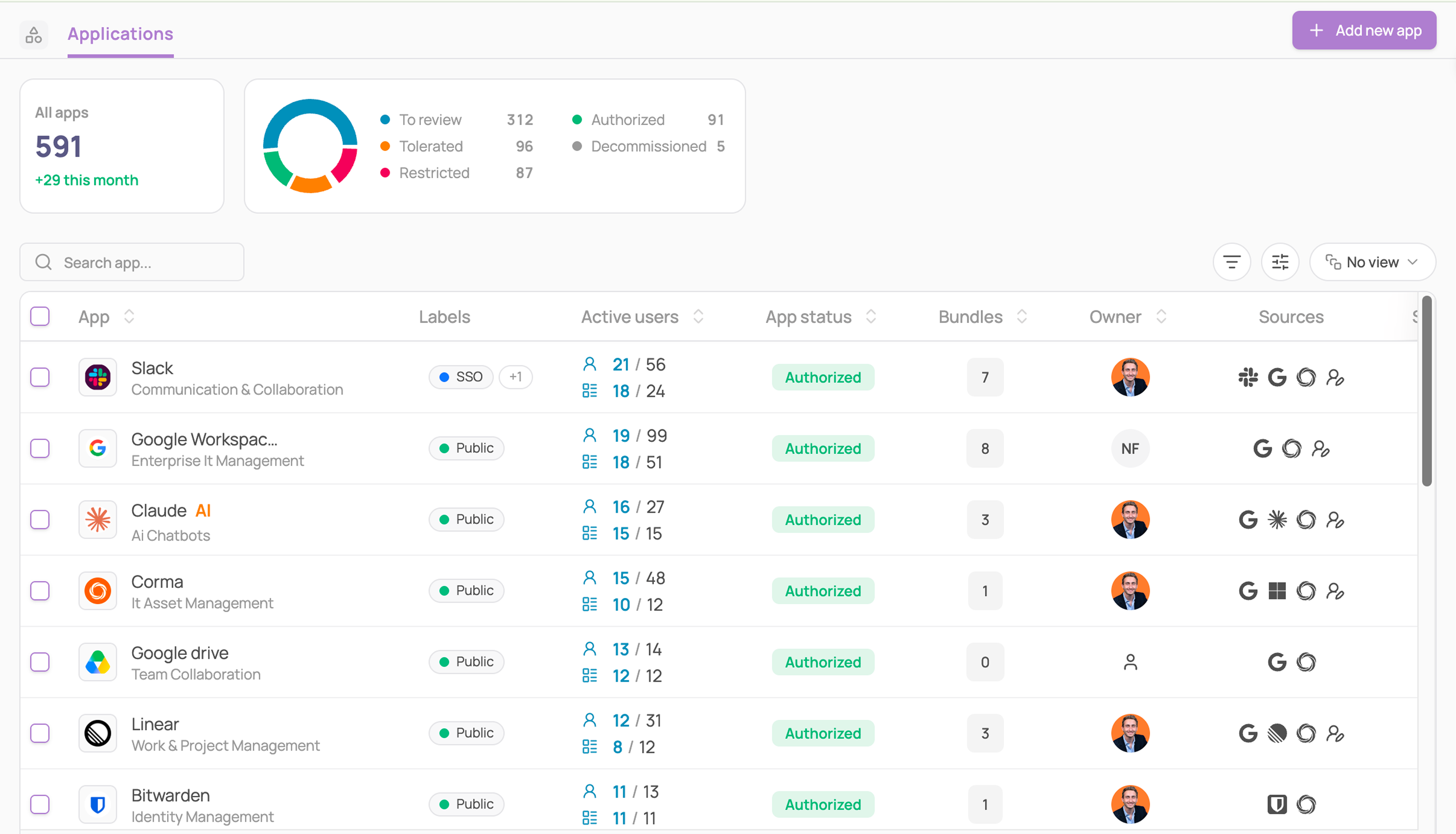
Corma's Applications module provides teams with a clear and actionable view of their IT environment. It centralizes all applications in one place and surfaces the information needed for governance and decision-making.
Streamlined Interface: A structured table layout improves readability and navigation, allowing you to quickly search, sort, and act on your application ecosystem
Authorization Filters: Applications are grouped into four categories: Authorized, Tolerated, Decommissioned, To review, and Restricted, making it easy to assess compliance and identify potential risks.
Enhanced Application Details: Each application displays its Active users, any related application groups, app owner, and, created date, offering deeper operational context. Use filters to quickly sort and analyze applications based on Criticality, Source and Contract dates (Start and renewal dates)
Labels: Apply your own color-coded labels to any app and filter the list by them, so you can group apps however your team actually thinks about them.
App specific page
Click on any app to open its page: a detailed view of one application that brings together usage, licenses, contract, access, and ownership in one place.
Tabs
Overview: Corma's overview page is designed to provide comprehensive insights into individual application usage. It includes:
Activity Breakdown: View the past 30 days of activity segmented by licenses with high, medium, and low usage.
Department-Level Insights: Dive into a pie chart showcasing usage by department, helping you identify which departments rely most on each application.
Most visited sub-pages: Discover which specific pages within the app get visited most, by how many users, and how recently
Similar Apps Comparison: Discover the most similar apps to the one you're analyzing, detailed by risk score and the number of users.
License Provisioning Overview: Track total provisioned versus active licenses with a clear visual chart.
Activity: All app users are listed with Status, Activity, Number of associated licenses, SSO Tokens, Subpages and Sources, making it easy to spot inactive or misconfigured access.
Licenses: All users with a professional license are listed with their license status, License type, Granted date, License role, Usage, Source
Contract: your single source of truth for what you're paying, when it renews, and where the savings are hiding; spend insights, invoices, and attachments included.
Tokens: every OAuth token granted to this app, by user, with the scopes requested. Revoke any token directly from this list.
Tickets: see every access action tied to this app in one filtered view, including requests, provisioning, and deprovision.
Notes: a free-text log for this app. Add a note and it's saved with your name and the date, so context sticks around for whoever looks at this app next.
Right-side drawer
Core information: Get an overview of the App status, App owner, Departments
Security: Each application's security card can be enriched with customizable fields, enabling a more structured tracking of key security information: Criticality of an App, Access owner, Additional info such as:
Server location (country)
Data sensitivity (public, internal, confidential, restricted, regulated)
Certifications (HIPAA Compliance, ISO 27001, SOC)
Authentication (MFA, SSO, SAML)
Labels: the labels applied to this app. Click the + to add or remove one.
App settings
At Corma, App Settings provide admins with granular control over how applications are managed, accessed, and optimized within your organization. These settings allow you to tailor each app’s behavior to your company’s workflows, security policies, and budgetary needs.
🎯 Use cases
Admin
Employee