

Audit logs are the history of every action performed in Corma, whether an integration, an agent, a workflow, Cormie or an admin made it. Use them to see who changed what, and when, and as evidence for ISO 27001 or SOC 2 audits.
What is recorded
Who acts | Examples of logged actions |
|---|---|
Integrations | Account created, access revoked, user added to a group |
AI agents | Accounts created or removed by an agent in an app with no API |
Workflows | Each action a workflow runs on a user |
Cormie | Actions Cormie carries out, recorded as made by Cormie with the name of the person who confirmed them |
Admins | Manual actions taken in Corma, shown as Manual action (see below) |
Audit logs are the history of what was done. Tickets are the list of what still needs to be done.
Manual actions that are logged
Area | Actions |
|---|---|
Licenses | Logging a license manually, changing a license type, role or status |
Tickets | Approving a ticket, changing a ticket's status (shown as "Marked {ticket ID} as {status}") |
User groups | Creating, updating or deleting a group |
Bundles | Creating, updating or deleting a bundle |
Owners | Changing an app's app owner, access owner or contract owner |
How to read an entry
Open the audit logs.
Click an entry to open its details: the action, the target user and app, who or what performed it, and when.
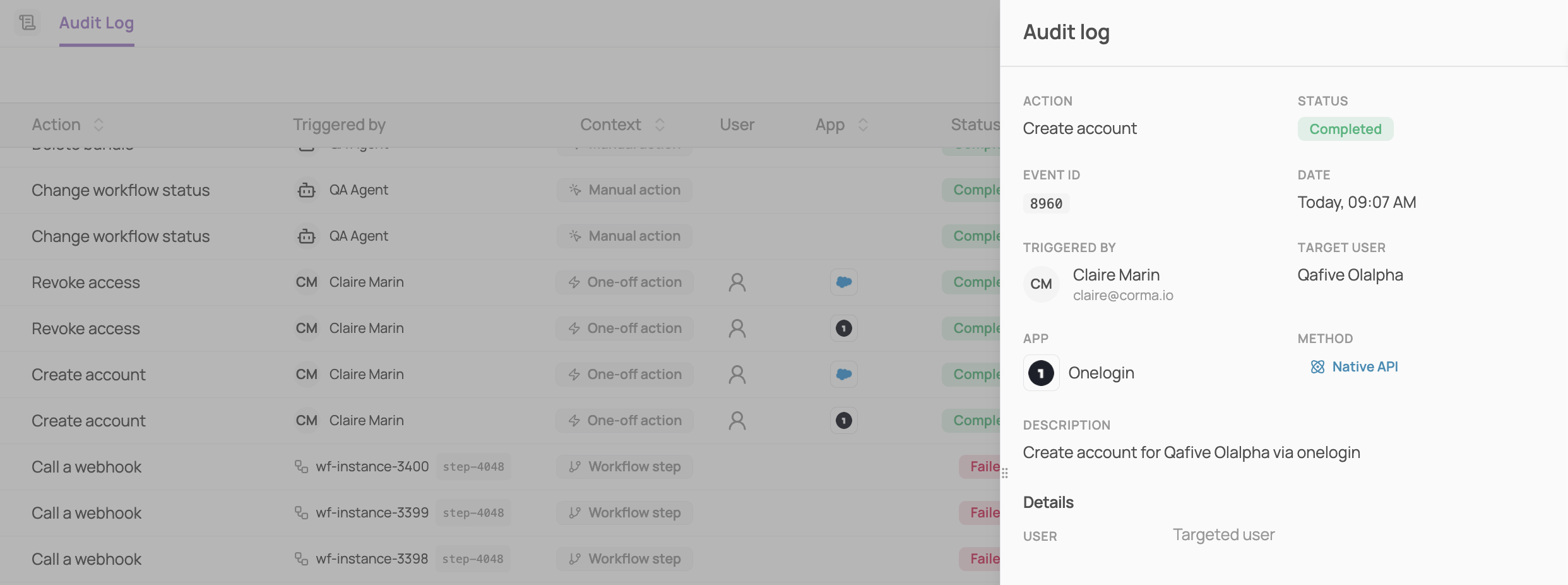
Check the outcome. A suspended user and a revoked access are logged as two different actions, so you can tell them apart.
ℹ️ For onboardings, the log shows whether the temporary password email was sent and to whom. It never shows the password itself, and it does not show the content of the email.
Audit logs and workflows
Each workflow also keeps its own detailed history in its Previous Runs tab, with every step, its input and output, and the path the run took. Use it to troubleshoot a specific workflow. Use the audit logs to see every action in one place.
Audit logs and access reviews
When an access review concludes, its Automatic actions tab lists the audit log entries for that review only.
Audit logs record actions as they happen. They don't show who had access to an app on a past date.