
Corma changelog
Merge users, delegate connector setup, and license alerts
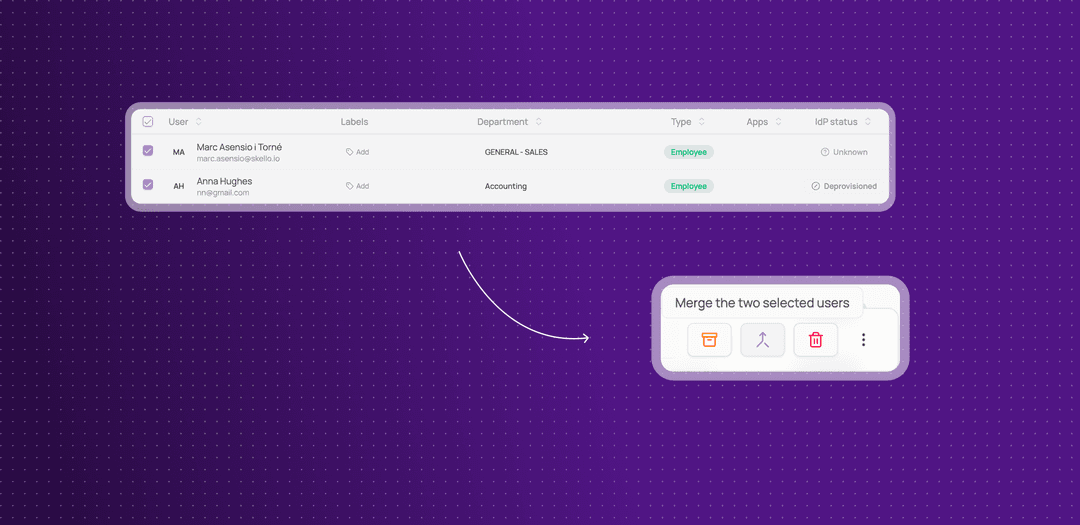
Merge two users into one
When the same person ends up twice in Corma, you can now merge the two records into one without losing anything.
Two ways to start: select exactly two users on the Users page and click Merge in the selection bar, or open a user and choose Merge in the actions menu.
Preview before you confirm: a comparison shows both users side by side, which email addresses and how many licenses the merged user will have, and lets you switch which user is kept.
Everything moves to the user you keep: licenses, groups, owned apps and workflows, tickets, notes, and audit history. If both users have the same license, it is kept once.
Unsafe merges are blocked: Corma tells you why and does not merge, for example when one of the two users has an onboarding or offboarding in progress, or when both are linked to the same identity or HR integration.
Admins only, and traceable: only admins can merge users, and each merge is recorded in the audit log.
This means a duplicate created by a rehire, a typo in an email or a second sign-in method can be cleaned up in one step, with the history and ownership kept.
Data that is calculated or tied to a single device, such as activity totals and desktop agent reports, is not carried over. Totals are recalculated after the merge, and the preview warns you when the user being merged has such data.
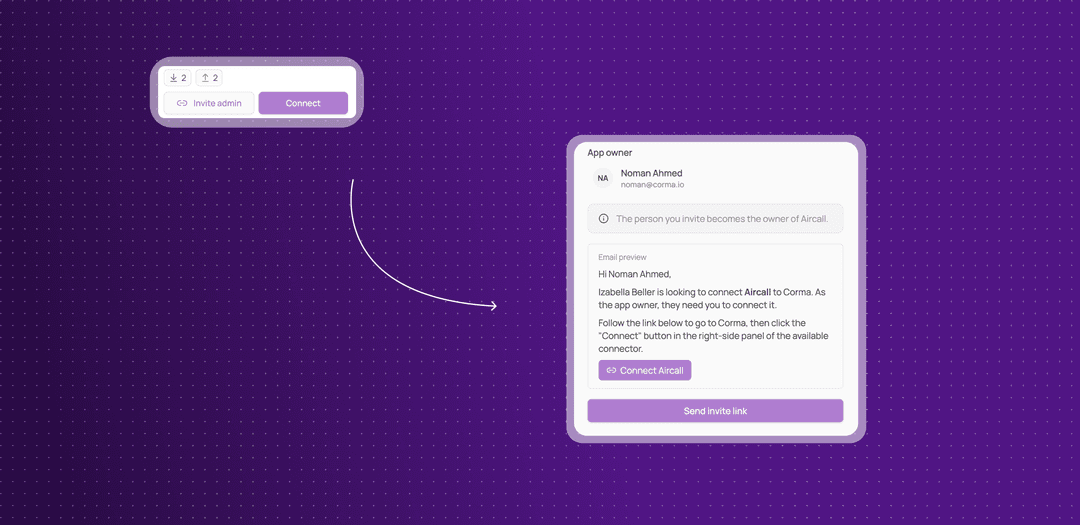
Delegate a connector setup to an app owner via email invites
When the person who needs an app connected is not the one who can connect it, an admin can now send the app owner an invitation from Corma.
Invite admin button: it appears on connectors that are not connected yet, in the connector catalogue and on the connector card of an app's page. Connected connectors still show Manage.
Check before sending: a window shows who will receive the email and a preview of it. If the app has no owner yet, you pick one first. You can only choose people who are already users in your workspace.
Send invite link: the email comes from Corma and links the person to the app's page, where they sign in as usual and click Connect on the connector.
The owner is updated: choosing someone different from the current owner makes them the app's owner, and the window says so before you confirm.
This means you no longer need to chase the right person on Slack to get an app connected.
See the Employee guides for how app owners connect and manage their apps.
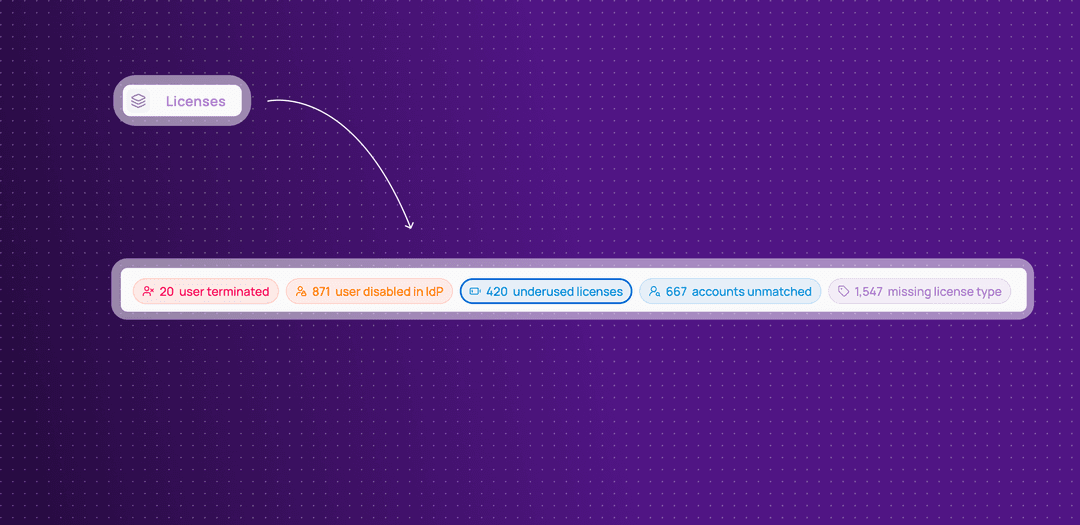
License alerts now live on the Licenses page
The Underused licenses and Orphaned licenses tabs of the Contracts page are gone. The same information now sits as alerts on the Licenses page.
Five alerts, one click each: user terminated, user disabled in IdP, underused licenses, accounts unmatched and missing license type. Each shows a count of live licenses and applies the matching filter to the table when you click it.
Filters you can see and remove: the filters an alert applies show in the Licenses toolbar.
Old links keep working: the old Underused and Orphaned addresses, and the links on the Overview Licenses usage card, open the Licenses page with the right filter.
This means you find the licenses to reclaim, from people who left or whose account is disabled, in one place.
Improvements
The Users page now has a Source filter, like the Applications page. It lists the sources that can create or update users, such as identity providers, HR systems and SSO apps, and shows users created or updated by the source you pick.
The Create user form now includes your custom user fields, and its sections are clearer.
Payfit and Rippling can now be mapped to Corma fields in Settings > HR Properties, including Rippling's custom fields.
The Sync now option is back on BambooHR and on the other HR connectors that run through the orchestrator.
The Datadog connector now works with custom data mapping for account creation.
Fixes
The Clear button in Edit saved filters not removing the filters has been fixed.
Removing the owner of an app from its settings failing has been fixed.
Deleting an app whose licenses appear in the audit log failing has been fixed.
Deleting a user timing out has been fixed.
The HubSpot Attribute license action failing has been fixed.
Changing a license's billing status or type blocking the page has been fixed.
An error appearing when you click a ticket or approval that someone else already handled has been fixed.
Microsoft and Google license revocation sync failure have been fixed.
Microsoft sub-license revocation syncs failing have been fixed.
The tables for API keys, labels and admins being cropped have been fixed.
Merge two users into one
When the same person ends up twice in Corma, you can now merge the two records into one without losing anything.
Two ways to start: select exactly two users on the Users page and click Merge in the selection bar, or open a user and choose Merge in the actions menu.
Preview before you confirm: a comparison shows both users side by side, which email addresses and how many licenses the merged user will have, and lets you switch which user is kept.
Everything moves to the user you keep: licenses, groups, owned apps and workflows, tickets, notes, and audit history. If both users have the same license, it is kept once.
Unsafe merges are blocked: Corma tells you why and does not merge, for example when one of the two users has an onboarding or offboarding in progress, or when both are linked to the same identity or HR integration.
Admins only, and traceable: only admins can merge users, and each merge is recorded in the audit log.
This means a duplicate created by a rehire, a typo in an email or a second sign-in method can be cleaned up in one step, with the history and ownership kept.
Data that is calculated or tied to a single device, such as activity totals and desktop agent reports, is not carried over. Totals are recalculated after the merge, and the preview warns you when the user being merged has such data.
Invite an app owner by email to connect an app
When the person who needs an app connected is not the one who can connect it, an admin can now send the app owner an invitation from Corma.
Invite admin button: it appears on connectors that are not connected yet, in the connector catalogue and on the connector card of an app's page. Connected connectors still show Manage.
Check before sending: a window shows who will receive the email and a preview of it. If the app has no owner yet, you pick one first. You can only choose people who are already users in your workspace.
Send invite link: the email comes from Corma and links the person to the app's page, where they sign in as usual and click Connect on the connector.
The owner is updated: choosing someone different from the current owner makes them the app's owner, and the window says so before you confirm.
This means you no longer need to chase the right person on Slack to get an app connected.
See the Employee guides for how app owners connect and manage their apps.
License alerts now live on the Licenses page
The Underused licenses and Orphaned licenses tabs of the Contracts page are gone. The same information now sits as alerts on the Licenses page.
Five alerts, one click each: user terminated, user disabled in IdP, underused licenses, accounts unmatched and missing license type. Each shows a count of live licenses and applies the matching filter to the table when you click it.
Filters you can see and remove: the filters an alert applies show in the Licenses toolbar.
Old links keep working: the old Underused and Orphaned addresses, and the links on the Overview Licenses usage card, open the Licenses page with the right filter.
This means you find the licenses to reclaim, from people who left or whose account is disabled, in one place.
Improvements
The Users page now has a Source filter, like the Applications page. It lists the sources that can create or update users, such as identity providers, HR systems and SSO apps, and shows users created or updated by the source you pick.
The Create user form now includes your custom user fields, and its sections are clearer.
Payfit and Rippling can now be mapped to Corma fields in Settings > HR Properties, including Rippling's custom fields.
The Sync now option is back on BambooHR and on the other HR connectors that run through the orchestrator.
The Datadog connector now works with custom data mapping for account creation.
Fixes
The Clear button in Edit saved filters not removing the filters has been fixed.
Removing the owner of an app from its settings failing has been fixed.
Deleting an app whose licenses appear in the audit log failing has been fixed.
Deleting a user timing out has been fixed.
The HubSpot Attribute license action failing has been fixed.
Changing a license's billing status or type blocking the page has been fixed.
An error appearing when you click a ticket or approval that someone else already handled has been fixed.
Microsoft and Google license revocation sync failure have been fixed.
Microsoft sub-license revocation syncs failing have been fixed.
The tables for API keys, labels and admins being cropped have been fixed.