
Corma changelog
Credentials Error Handling & Agent Performance
Creds Checking and Notifications
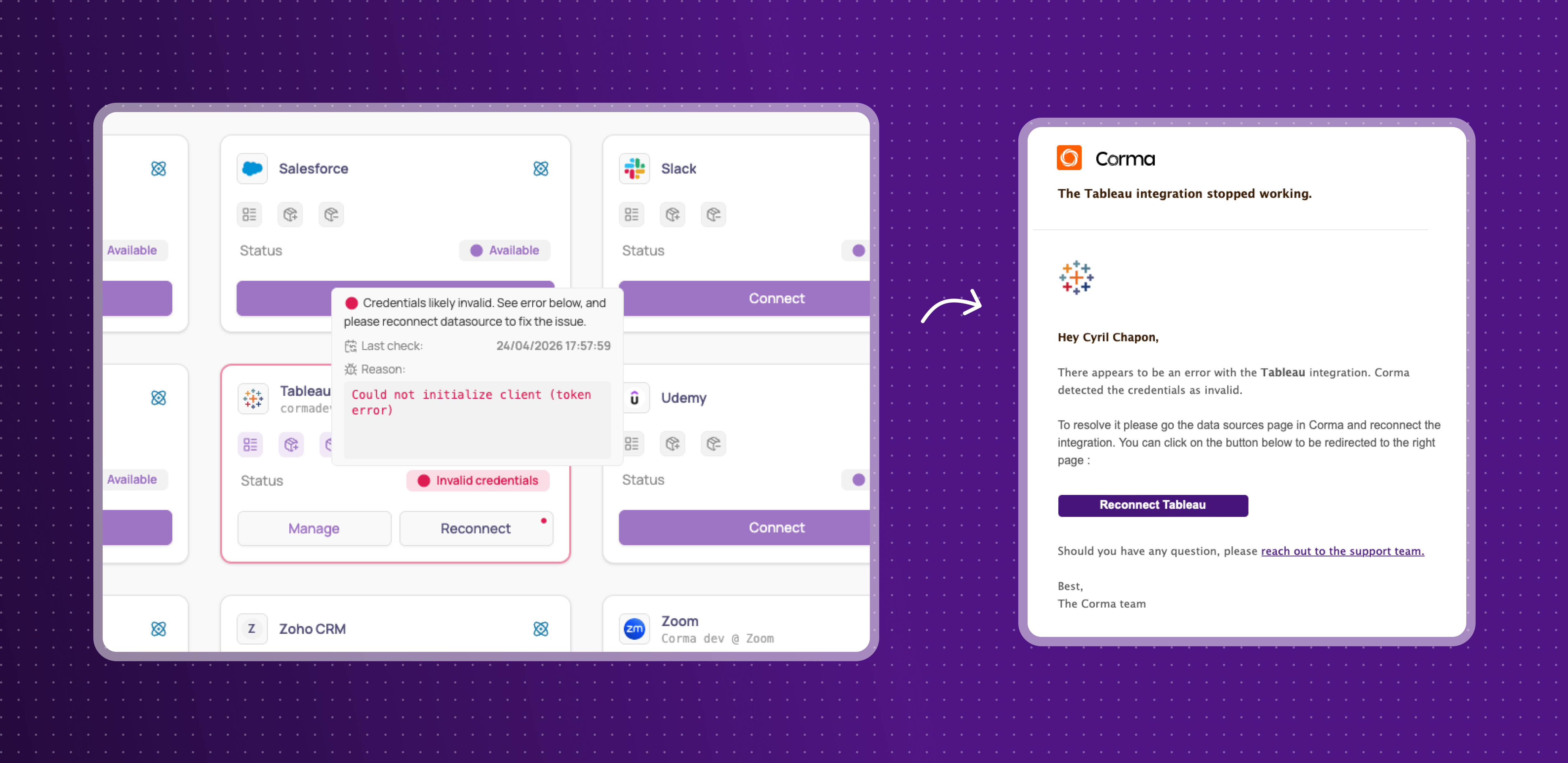
Corma now automatically monitors the validity of integration credentials and alerts users when a connection breaks or loses the required permissions.
Real-time credential monitoring: a background process continuously checks whether stored credentials are still valid and flags any that have expired or lost the necessary access rights
Proactive alerts: users receive email notifications and visual indicators directly on the integrations page when a credential needs to be renewed or reconnected
Clearer sync visibility: the integration drawer now shows real-time sync status, last sync time, logs, and errors in one place
Teams relying on automated data syncs will catch broken connections before they cause data gaps or failed automations, keeping their SaaS access data accurate and up to date.
Clicker Agent login time optimization
Significant performance improvements have been made to the Clicker Agent's login process across several apps, reducing the time it takes for the agent to connect and start executing tasks.
Notion login: optimized by removing redundant wait times and simplifying the navigation flow, cutting login time from 152s to 101s (~50% faster)
Cursor login: same optimization approach applied, with over 50% speed improvement
Claude.ai login: replaced a slow AI-based session detection method with a simple URL check, cutting detection time from 18.6s to 9.4s (2x faster)
Users relying on Clicker Agent automations will notice significantly faster execution times across key apps, translating into a smoother and more reliable overall experience with Agents.
Improvements
Google offboarding data transfer: when offboarding a Google user, admins can now transfer their Calendar and Looker data to another employee, in addition to Drive files.
Group selection filtering by org unit: when creating user groups, admins can now filter the selection by specific organization units instead of browsing the entire organization.
Unified top navigation bar: all pages now share a consistent top nav bar with breadcrumbs, smaller buttons, and a repositioned sidebar collapse control.
Fixes
Browser automation sessions failing silently or running incorrectly have been fixed
Several login flow bugs causing incorrect task failure reports and unnecessary retries have been resolved
A background infrastructure process causing unexpected system restarts has been fixed
White screen and access errors when switching between workspaces have been resolved
Dashlane integration user data issues preventing proper offboarding have been fixed
License-to-user matching performance issues have been resolved
Manager task approval for manual group additions has been fixed
User profile sidebar email display and alignment issues have been corrected
Unmatched licenses not showing suggested matches have been fixed
New employee sign-up blocking errors have been resolved
Line item display issues have been fixed
Workspace fallback owner notification failures have been resolved
Broken links on app pages have been fixed
Microsoft account credential verification issues have been resolved
Google login credential refresh failures have been fixed
Onboarding and offboarding now blocked with a clear warning when system configuration is incomplete
Microsoft group sync freezing all Microsoft operations has been resolved
Offboarding notifications incorrectly showing account creation messages have been fixed
Slack, Google, and Microsoft integration action errors preventing key workflows have been resolved
Long license type names overflowing in app settings now truncate cleanly
Employee access to admin-only pages has been properly restricted
Indefinitely loading data tables have been fixed